Showing posts with label apps. Show all posts

23 Feb 2015

Gear: Strava (app)

During the past six months or so, I transitioned from using Endomondo to Strava as my go-to activity tracker. You may have read my previous post about Endomondo (click here to view it). I struggled with the decision for one major reason: I had convinced a lot of my friends to start using Endomondo in the first place, so I didn't want to abandon them. One of the things I liked about Endomondo was the ability to create challenges, which I could make public or private, and invite my friends to join and compete against. It was a good motivator for some healthy competition.

However, I was really interested in some of the work being done with the data logged on Strava. You see, Strava Labs, the company that created Strava, compiles their data, anonymizes it, and uses it to map the frequency that people use different routes on bicycles. This data can be incredibly useful for city planners to use as a guide for planning or for others to use for research. One such example is bikemaps.org which, from what I understand, is a research project by a group of students at UVic (University of Victoria). They use Strava Labs' data, plotted on a map, and overlay it with accidents involving cyclists using publicly available information from ICBC. What you get is an incredibly useful map that shows the routes cyclists use most frequently and where incidents occur. Users also have the option of manually logging hazards, near misses, and accidents not reported to ICBC.  Because I strongly support further development of safe infrastructure for people (pedestrians, cyclists, and drivers), I wanted to contribute to this information. So I decided to give Strava a try.

Before I begin, I should also let you know that I am now using an iPhone rather than an Android. When I started my new job last summer, I was issued an iPhone. So rather than carry two phones, I gave up my personal Android and now use an iPhone exclusively. As such, I am referring to Strava on an iPhone when I complete this review, although I assume the Android version is nearly identical.

Right away, Strava's app is clean. I like the dark grey and orange interface. I like the clean bold numbers on the display. The apps itself is incredible accurate and runs in the background without any issues. As a data logger, it is near flawless.

One thing I like is that Strava has excellent integration with Garmin Connect. When I connect my Garmin Edge 200 to my computer, which now automatically syncs to Garmin Connect through Garmin's redesigned plugin, Strava almost immediately pulls right from Garmin Connect and displays my workout. I only use my Garmin Edge for my longer rides, though; I log the majority of my rides simply using my phone.

Now Strava does not have challenges like Endomondo does. But Strava has Segments. You can create Segments from any of your past rides or runs. Once a Segment is created, Strava shows everyone's time who rides or runs that Segment. There are a number of popular segments in my area and I like to see how my time on that segment compares to others. It's an interesting way to add a bit of incentive when you're out riding or running. One major advantage Strava has is that a huge number of cyclists use it, including a large number of professional athletes. While I loved the social aspect of the way Endomondo is designed, I never felt like there were very many people using it in my area. With Strava, there are a ton of other riders and runners in my area on there.

The Profile screen show my distance for the week. From there I can click into Statistics or Gear. The statistics screen is clean and provides useful information. I can see my distance and time as an average per week, for year-to-date, and all time. All things I like to keep up on.


One of my favourite features though is the ability to track the gear I use. When I complete a bike ride, I tell Strava which bike I rode. Likewise when I run, I select the shoes I used. Strava then shows me how many kilometres I have put on each pair of shoes and on each of my bikes. From Strava's website (not in the mobile app), I can also add components to my bike, such as chain, crankset, wheels, tires, drivetrain, freewheel, and Strava will track how many kilometres I have put on each component. I find this incredibly useful to know how much I have put a component through before paying for a replacement.

Overall, I have been more than impressed with Strava. Both the community aspect of it and the strong user base make compelling cases. I love that Strava Labs makes their data available. After a ride, I love checking which segments I rode through and how I ranked in them. I love that Strava tracks my gear and even individual components.

As a final point, to avoid abandoning those of my friends on Endomondo, I use an online tool called Tapiriik to automatically sync my rides from Strava to Endomondo. That way, I log my activities in Strava and use Strava almost exclusively; however, I can check Endomondo periodically and can still participate in challenges with friends on Endomondo. Temporary measure though, which I'll give when I convince everyone to switch to Strava.

31 Mar 2014

Gear: My Fitbit Force Got Recalled So I Got a Fitbit One

First, let me state that I loved my Fitbit Force (click here to read my initial post about it).  However, it seems that an increasing number of people have been having issues with skin irritation.  While it is not entirely clear what the cause is, it seems that it could be anything from an allergic reaction to the nickel in the metals or to the adhesives or even something to do with battery fluids leaking.  The message, according to the recall notices, seems to have shifted from being if this happens to when.  In the most recent email that I received from Fitbit on March 20, 2014, it states very clearly that "consumers should stop using the Fitbit Force Activity-Tracking wristband and return the product to Fitbit for a full refund."  Prior to this email, I thought the recall was at my discretion or specifically for users that had experienced symptoms.  However, it is now clear that they are pulling all Fitbit Forces back (dlick here to read the letter from Fitbit CEO, James Park).  So the time has come to say goodbye to my Force.

Over the last couple of months, I have grown really attached to my Fitbit.  I enjoy being able to track my activity.  I like having my data available at my fingertips, on my phone, on the device itself, and on my computer.  On days I run, I hit my step goal without any problem.  However, on my off-run days, I have to find other ways to make sure I keep my activity levels up.  As a result, I have changed my way of doing things.  I always take the stairs as opposed to the elevator.  I force myself to walk around periodically to avoid sitting still for too long.  At work, I use bathrooms farther way and on different floors.  At home, I do more errands by foot or bike rather than car.  And if all else fails, I go for a long walk in the evenings once everyone else in my house has gone to bed.

While some of these changes I could easily do with or without a Fitbit, I like the added accountability.

I researched alternatives to the Force again, such as the Flex and the Jawbone Up - both of which are also wristband trackers.  The Flex, however, does not have a display or a have built-in altimeter.  No display means you have to sync to your phone before you can review your data.  No altimeter means that it cannot count flights of stairs climbed.  The Jawbone Up and Up24, for whatever reason, just do not appeal to me.  They also have no display and I have heard that their accuracy is not as good as the Fitbit devices.

So I looked at the Fitbit One.  The One is not worn on the wrist; it comes with a belt-clip.  And even though it is older than both the Force and the Flex (it was released in the fall of 2012), it has all of the features of the Force.  It has a display and the silent alarm.  It tracks steps, distance, calories, sleep, and stairs climbed.  The one feature it does not have is that it does not calculate active minutes on the device itself.  It does, however, calculate them in the Fitbit app once you sync it to either your phone or computer.

The one major change is where the One is worn.  Because it has a clip and is not a wristband device, finding a comfortable location for it takes some trial and error.  It can be clipped onto a belt, pocket, shirt, or anywhere else you can think of.  I have moved it from the high part of my pockets to the low part.  I've tried it on my belt and waistband.  Typically, I prefer wearing mine clipped to my pocket facing in (clip facing out) although some of my pants have the pocket seam too thick for the clip so I occasionally have to use another location.

The device itself I find to be far more accurate than the Force.  The One is less susceptible to counting missteps because it is closer to my body than at the end of my arm.

The sleep wristband is exceptionally comfortable.  However, it is an added step to remove it from the clip and place in the wristband each night and vice versa in the morning.

One initial problem I had was that, as a lefty, every time I picked up the device with my left hand, the display was upside down.  However, I was pointed to a setting on the Fitbit Dashboard to change the display to a left-handed setting.  Note that this setting is only available from the Fitbit Dashboard and is not available in the mobile app (at least not in the Android version at the time I write this).

One feature I would like is, similar to on the Force, the ability to re-order the display of the different functions on the device itself.  You can re-order and hide functions in the Fitbit Android app but not on the device itself.  Further, on the Force, when you pushed the button it would start at the Clock and then cycle through the functions in the determined order.  The One remembers the last function viewed and starts there.  I would personally prefer to start at the beginning each time and cycle through from there.

Overall, I love the One.  Even more so than the Force.  I appreciate that it is a little bit more discrete.  And while it is an older device, it has all the features and functions that I want and use.  Further, while Fitbit has promised a successor to the Force, there is currently no indication as to when that will happen.  While it could be soon, I feel that the One is not so much of a compromise because all the features are still there.  So if you have to return your Force and don't want to wait for its successor, I recommend the Fitbit One.

11 Jan 2014

Gear: Fitbit Force Activity Tracker

Fitbit and the whole activity tracker idea is something I've been intrigued with for over a year.  I originally watched the Jawbone Up and the Fitbit Flex to see how they performed and what issues people had with them.  Both were early iterations of the technology used and were limited in each of their own respects.  Among other things, the original Jawbone Up had no wireless connectivity and the Fitbit Flex had no altimeter.  Neither one had a display.

This past fall, both Jawbone and Fitbit released new versions of their devices.  The Fitbit Force was introduced with a display, which also tells the time.  I liked the idea of a device worn on the wrist as opposed to the Fitbit One, which clips to a belt, clothing, or slides into your pocket.  I liked the new features, including the altimeter.  I liked that it had a display.  Both the web-app and Android app had very clear displays.  And I liked the silent alarm feature.  The Jawbone, in contrast, while a bit more aesthetic in my opinion, limited newer versions of their device to only sync wirelessly with  iOS devices - a painfully limiting product strategy.  But without wi
reless sync and no display to check on progress, that ruled that one right out for me.


So this year, for Christmas, my wife got me a Fitbit Force.  And I love it.  It has replaced my watch so I am not carrying anything additional - merely switching out my watch for a Fitbit.  I like tracking my steps.  I have left it with the default daily step goal of 10,000 steps.  On days I am not working, like weekends, I seem to blow past this goal and reach even 15,000 steps in a day.  However, on days I work, I have to go for a short walk on my lunch and even a 30 minutes walk in the evening (unless I run that particular day).  It has forced me to assess how much time I spend at my desk.  Even in the short time I've had it, I've taken the stairs more often and escalators less (unless I have my 3 year old with me - he loves escalators).

At first, I admit, I was quite nervous that the strap would come undone and my Fitbit would fall off my wrist.  It does "clip" together nicely but I have had it snag on clothing and come off.  Ironically though, the more I wear it, the less that happens.  This is contrary to what I would have thought - I would think more wear would make it a bit looser and easier to come undone.  But I think what is happening is that it is molding more to its shape on my wrist and, therefore, is more "relaxed" in it's buckled form.

My one complaint with it is that it is not waterproof.  I'm used to leaving my watch on - in the shower, swimming pools, etc.  So I have to remember to take off my Fitbit.  It would be ideal if it was waterproof, just like its Flex predecessor.  But it is water resistant to splashing, etc.  So a rainy run and sweat is not going to affect it.  The shower, in all honesty, would probably be fine for it - I've heard of others that wear it in the shower without a problem - but I'm not willing to chance it intentionally.

To some, it may seem over the top to be logging/tracking almost everything you do.  For me, it was simply a way to see how active I am in a given day or week and, thus, to remind me to get off my butt when I've been sitting for too long.  I have an office job; I sit at a desk all day.  Yes, I run, but that's not everyday and still not enough on its own.  So sometimes I just need a reminder to tell me how much I've been sitting.  That, and I do have a propensity to log and track things.

So if you're in the market for an activity tracker, I recommend the Fitbit Force.

Update March 30, 2014: Fitbit has voluntarily recalled the Fitbit Force.  Click here to read my follow-up post.

10 Jan 2014

Gear: Impetus Interval Timer (Android app)

In order to follow my Learn to Run 10K training plan (see my previous post HERE), I wanted to be able to program in my all my intervals without having to worry about look at my watch.  I was previously using the chronometer on my Timex watch and using the lap button to time each interval.  Counting the number of intervals took some thinking and I had to memorize the workout before setting out.  All seemingly simple tasks; but running on my lunch breaks during busy, hectic work days, I did forget a couple of times how many repeats I was supposed to do or how long each one was.

So I started perusing the Google Play Store for an interval timer.  Now, Endomondo does have this functionality in their app too, but only in the premium (i.e. paid) version - I'm looking for free.  I tried a couple out (HIIT Interval Training Timer by Caynax, Interval Timer - Seconds Free by Runloop) but immediately didn't like them.  As soon as I opened them, they looked overwhelmingly complicated.  I admit, that's as far as I went with them.  Uninstalled.

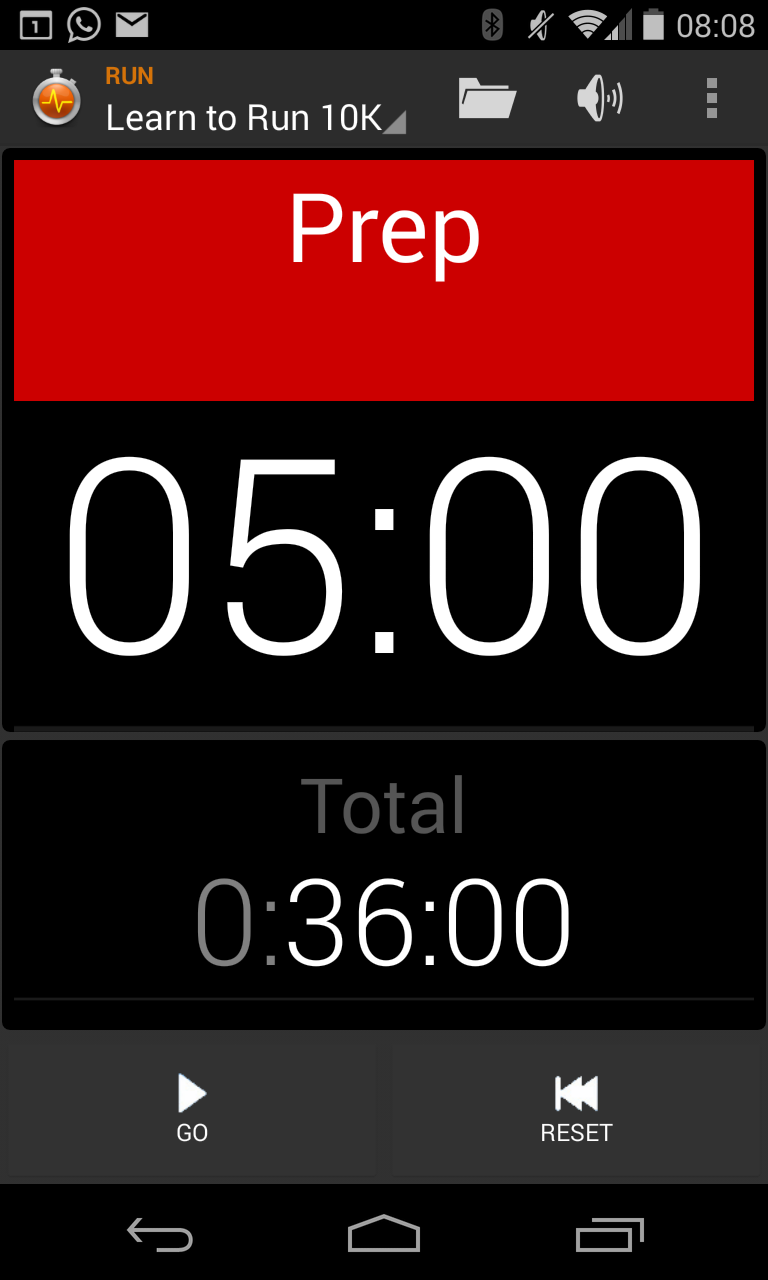
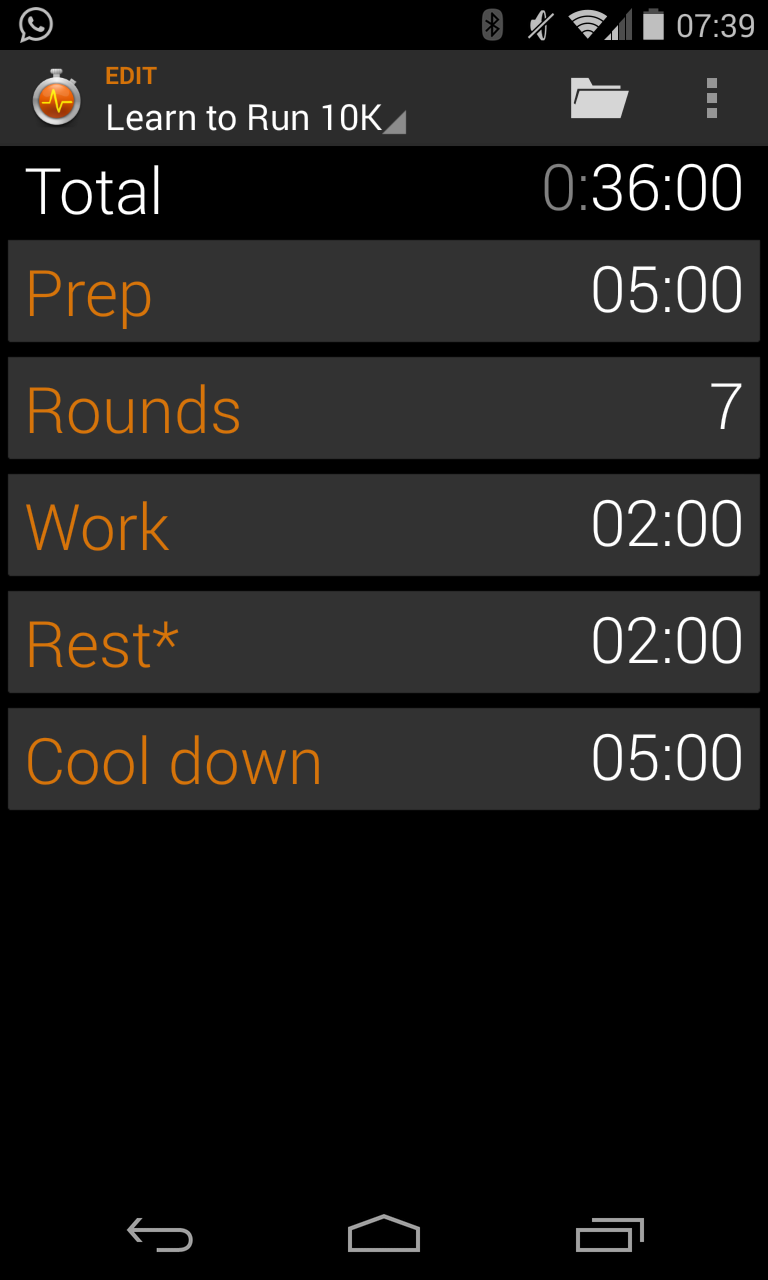
Then I tried Impetus Interval Timer.  Open it up and it's got a very simple, minimalistic display.  In the top left beside the app's own icon it shows the current "preset".  Click it to enter Edit mode.  From here, you can change the warm-up time, number of interval, time of work and time of rest for each interval, and cool down time.  This all follows their simple preset template.  Click on the current "preset" again to go back to Run mode.

Click the folder icon along the top menu bar to change to another preset.  The app comes preloaded with many presets.  I removed them all so I only have my Learn to Run 10K preset for the week one other one that I'll use for off-day bike rides.

Within the menu button in the top right is Settings.  There are a couple of settings I would recommend changing.  When I run, I listen to music.  Not loud, but just enough for the rhythm to keep me on pace.  However, I could barely hear the beeps (alerts) of the app telling me when each interval ended.  So under Settings, click Alerts and sounds.  Uncheck the box that says "Use media stream".  This allows you to set a separate volume for the alerts.  The next option I would check is "Mute music".  This is temporarily mute your music while it plays the beep, which will simply ensure that you hear those beeps.

One other setting I changed is under Display.  I have unchecked the box that says "Keep screen on", yet my screen still seems to stay on during my workout.  Just means I manually have to turn my screen off until I figure out what is keeping it on.

But that's it.  It looks great.  It's simple.  And it works.  Does exactly what I need it to do.

5 Jan 2014

Gear: Endomondo (app)

I admit it - I'm a geek.  I log things and I write everything down.  I like to keep stats and understand progress.  I track fuel mileage in my car and I track every kilometre I run or ride.  But I'm also a tech geek.  If there's an Android app for it, I will find it.  And if it's free, I'll try it out.  Combine my tech geekiness and my need to log things and you have someone who incessantly tries out and tests new apps that track stuff.

A couple of years ago, for my bike rides, I got a Garmin Bicycle GPS (Edge 200).  While I love the device itself, I was never satisfied with the Garmin Connect website.  Which led me to search for something that worked on my phone (an Android Motorola Atrix 4G at the time) and also allowed me to import from my Garmin Edge.  I tried a few: MapMyRide, Google's My Tracks, to name a couple.  But then I found Endomondo (available on Android, iOS, and some BlackBerry devices).

I immediately liked the straight-forward layout and simple functionality.  And the social media junky in me appreciated the ability to add friends and share my workouts.  I can log my runs and rides directly on my phone, which uploads upon completion to the website, or I can log them on my Garmin Edge and import them afterwards directly to Endomondo (still requires the Garmin plugin to be installed on your computer).  While I had all kinds of trouble with the GPS signal on my old Motorola Atrix, my Nexus 4 is a dream and rarely loses signal at all.

One of the things I like about the website too is that I can plot my rides before I set out, allowing my to set a distance and plan my time.  Helpful if I'm running or riding in an unfamiliar area and want to explore a little but without getting to far.

There is a premium version but I've always found the simple free version to be more than sufficient.